Missed-Call Text Back
Missed the call? Don't miss the job
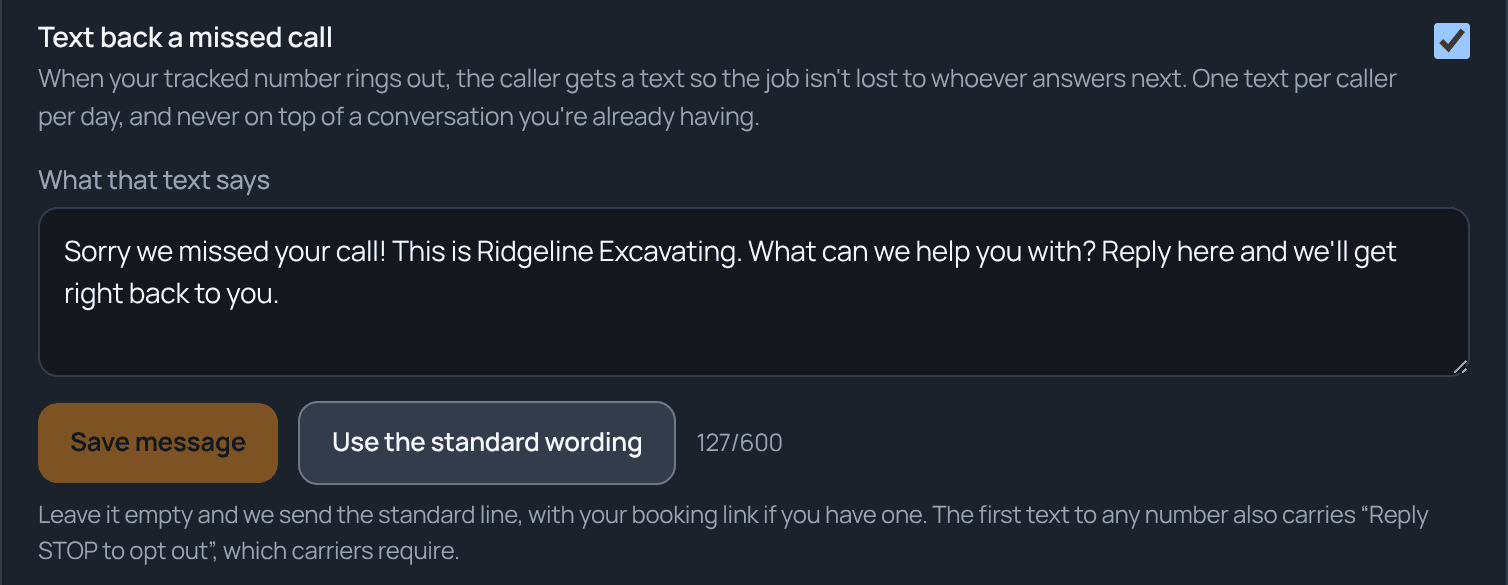
When your TrackOver number rings out because you're on a machine or under a truck, the caller gets a text right away: sorry we missed you, how can we help? It's off until you turn it on, you pick the wording, and if you want, TrackOver keeps the conversation going to get the job details onto the lead for you.
Sound familiar?
- A homeowner calls three contractors and hires the first one who calls back
- You can't answer the phone from the seat of an excavator
- Voicemails pile up and half of them never get returned
How TrackOver handles it
- A text the moment you miss itWhen your tracked number rings out, the caller gets a text so the job isn't lost to whoever answers next. One text per caller per day.
- Off until you turn it onNothing is sent until you switch it on in Settings, under Customer messages. A pause switch stops every automatic text at once.
- Your wordsWrite your own message, or leave it blank and send the standard line with your booking link if you have one.
- Gets the job details for youTurn on the follow-up too, and when the caller texts back, it asks what work they need, the address, when, and for a photo, one question at a time. It never gives a price or a promise.
- Lands on the leadThe answers go on their lead with a short summary and a suggested next step, and you get a notification when it wraps up.
- Knows when to stopThe follow-up stops the moment you text them yourself, never texts between 8 PM and 8 AM your time, and nothing goes to anyone who replied STOP.
Common questions
What do I need?
A TrackOver phone number for calls (your tracked number). The text-back works off the calls that ring it.
Will it text someone twice?
No more than one missed-call text per caller per day, and never on top of a conversation you're already having with them.
Does the follow-up use AI?
Yes. The follow-up that gathers job details is optional, uses your AI allowance, and is limited to 5 texts per call.
It all works together
- Jobsite Photos
- Time Tracking
- Scheduling & Dispatch
- Estimates & Invoices
- Team Messaging
- Reports & Job Costing
- All features →
See how missed-call text back fits your trade:
Run your next job through it
Set it up on one real job this week and see it work.