Know a job is going over while you can still fix it
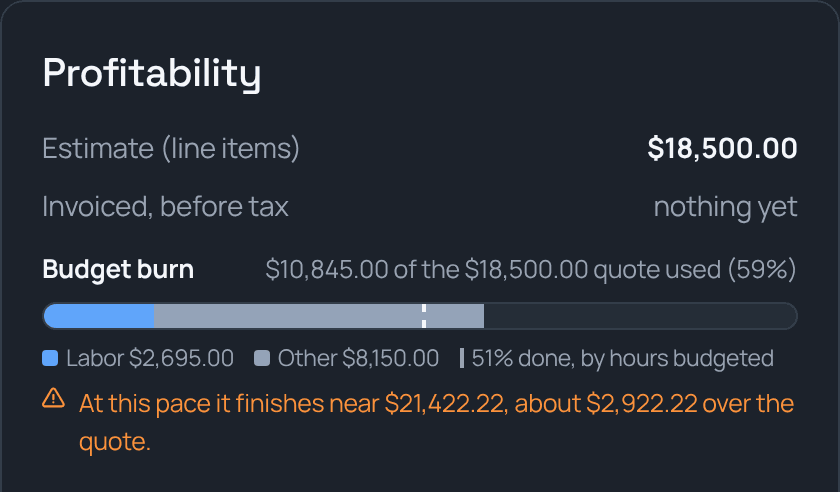
Every job gets a budget bar: the quote, filled in by what's been spent on labor, machines, materials, and subs. A mark shows how far along the job is, and one plain line tells you where it's going to land at this pace. If it's heading over the quote, the job page says so while there's still time to do something about it.
Sound familiar?
How TrackOver handles it
The quote as a bar
Labor, machines, materials, subs, and other costs fill the bar as they come in, so you can see what's eating the job.
How far along, honestly
Measured by the work actually put in when you set budget quantities, by hours budgeted, or by the schedule. The bar says which one it used.
Where it lands at this pace
"At this pace it finishes near $21,400, about $2,900 over the quote." One line, in dollars, while the job is still running.
A warning before it's over
The line turns from green to amber and orange as a job uses up its quote or trends over, and red once it's past.
Real labor cost
Hours are priced at each person's pay rate with your labor burden added, from the same time clock your crew already uses.
Owners and managers only
Crews don't see job money. The bar is on the job page for the people who run the numbers.
Common questions
Does it work on the first day of a job?
It shows what's spent right away. The forecast waits until the job is far enough along to mean something, so a load of pipe delivered on day one doesn't set off a false alarm.
What do I need to set up?
A quote with line items and your crew's pay rates. Add budget hours or quantities, or schedule the job over several days, and you get the at-this-pace forecast too.
Is this different from job costing reports?
It uses the same numbers. Reports look back at finished jobs. The burn bar watches the job you're on right now.
It all works together
See how job budget burn fits your trade: