Know where your money stands without opening a spreadsheet
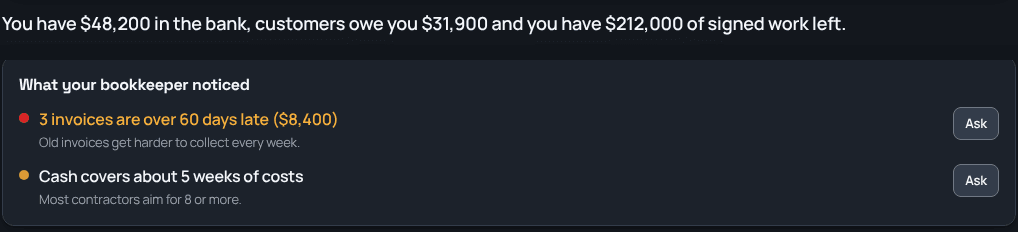
Finances puts your business in one sentence at the top: what's in the bank, what customers owe you, and how much signed work you have left. Under it, a short list of what your bookkeeper noticed, like invoices getting old or how many weeks of costs your cash covers. Have a question? Ask your bookkeeper in plain words and get an answer from your own books.
Sound familiar?
How TrackOver handles it
The big numbers, in one line
Cash in the bank, what customers owe you, and the signed work you haven't billed, written out in a sentence at the top.
What your bookkeeper noticed
A short list of things worth a look, like invoices over 60 days late or how many weeks of costs your cash covers, each with a button to ask about it.
Ask your bookkeeper
Type a question about your money in plain words and get an answer from your own invoices, bills, and jobs.
Your books, kept tidy
Payments, receipts, and supplier bills land in one place, ready for whoever does your taxes.
Easy hand-off to your accountant
Send invoices and payments to QuickBooks or Xero, or hand over clean files at the end of the year.
For the people who see the money
Owners and managers who can see all the money get Finances. Crews never see it.
Common questions
Is this tax advice?
No. It's a plain-language look at your own numbers. Check with your accountant before you act on anything tax related.
Do I have to set anything up?
It reads the invoices, payments, bills, and jobs already in TrackOver. Connecting your bank fills in more of the picture.
Can my crew see it?
No. Only owners and managers who can see all the money.
It all works together
See how finances fits your trade: