Customers stop calling to ask where you are
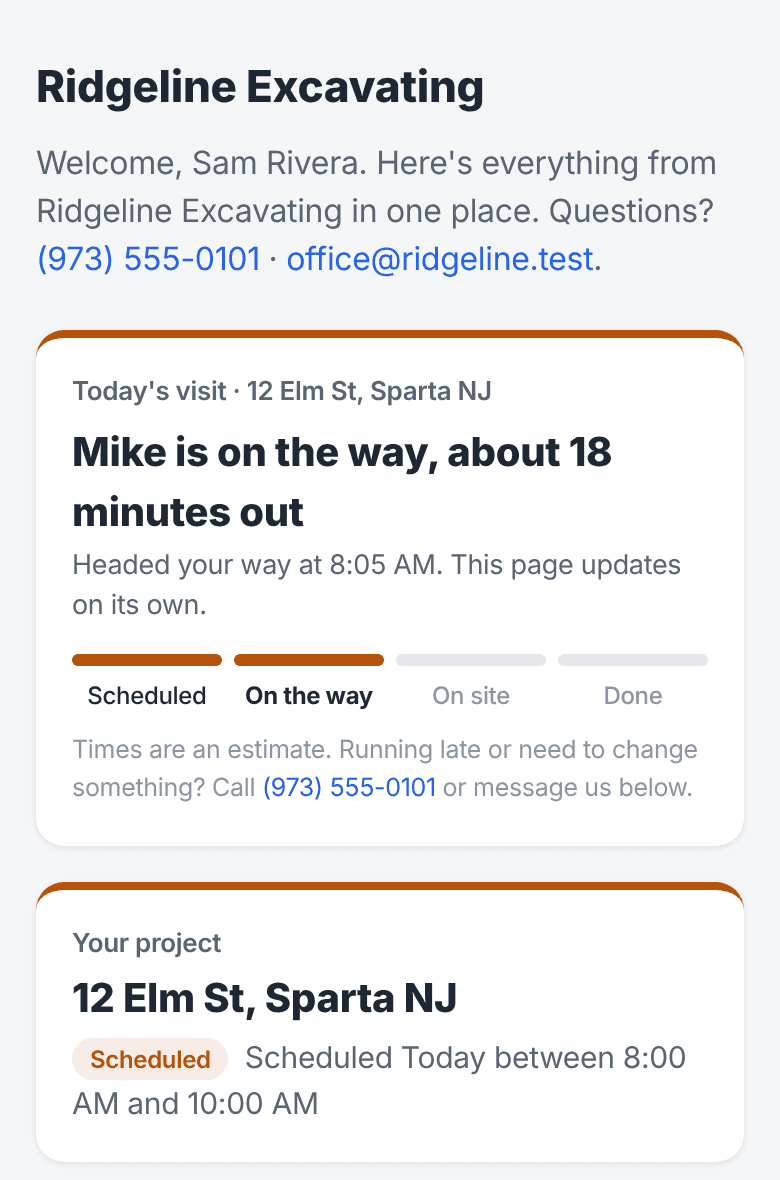
On the day of the visit, your customer's page shows where things stand: Scheduled, On the way with how many minutes out, On site, and Done. It moves on its own from what the crew already does, so nobody in the office has to answer the phone to say the truck is coming.
Sound familiar?
How TrackOver handles it
Four steps anyone can read
Scheduled, On the way, On site, Done. The current step is marked, and the headline says it in plain words, like "Mike is on the way, about 18 minutes out".
Runs on the On my way text
When the crew taps On my way, the customer gets the text and their page switches to On the way. Nothing extra for the crew to do.
Minutes, not a map
The ETA comes from the crew's live position when they share it, or counts down from the minutes in the text. The customer sees minutes, never where your truck is.
On site when they clock in
Once someone clocks in on that job, the page says who is at the property now. When the job is marked done, so is the page.
Updates by itself
The page refreshes on its own, so the customer can leave it open on their phone and watch it move.
Your company, your colors
It's part of the customer's own page with your name and colors, next to their estimates, invoices, photos, and messages.
Common questions
Can the customer see where my crew is on a map?
No. They only see the step and the minutes. The crew's location is never shown to the customer.
Does my crew have to do anything new?
No. The page moves from things they already do: the On my way text, clocking in on the job, and finishing it.
Does the customer need to download an app?
No. It's a web page they open from their link on any phone or computer.
It all works together
See how customer job tracker fits your trade: