See your whole day on one map
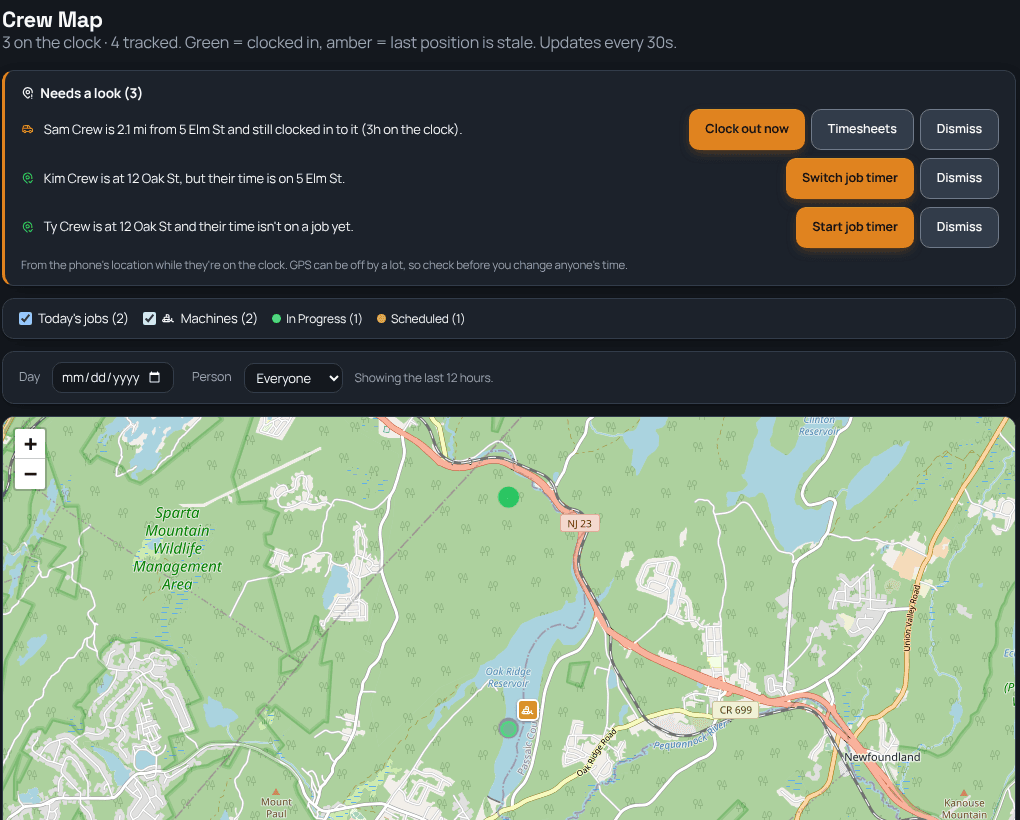
The Crew Map shows who's on the clock and where, today's jobs in their status colors, and the machines on the jobs they're booked to. Above the map, a short Needs a look list catches the things that cost you money, like someone who left the job an hour ago and is still clocked in, with a one-tap fix right there.
Sound familiar?
How TrackOver handles it
Who's where, right now
Crew pins update on their own while people are on the clock. Green is live, amber means the last position is getting old.
Jobs and machines too
Today's jobs show in their status colors, and each machine shows on the job it's booked to.
Needs a look
Catches someone far from the job they're clocked into, at a different job than their timer, or on site with no job timer running.
One-tap fixes
Clock out now, switch the job timer, or start it, right from the list. Or dismiss it if it's fine.
Left the job? You'll hear about it
When someone is well away from their job an hour or more into a shift and still clocked in, they get one reminder and the office gets one heads-up. You can turn it off in Settings.
Only while on the clock
Locations are read only while someone is clocked in. Nothing is tracked after they clock out.
Common questions
Does it track my crew after hours?
No. It only reads a phone's location while that person is on the clock.
How accurate is it?
As accurate as the phone's GPS, which can be off. The list says so, so check before you change anyone's time.
Which plan is it on?
The Crew Map is part of the Elite plan.
It all works together
See how crew map fits your trade: